# Use West Kite from the terminal
> Documentation index: [llms.txt](https://westkite.com/docs/llms.txt). Every page is also at its URL plus `.md`.
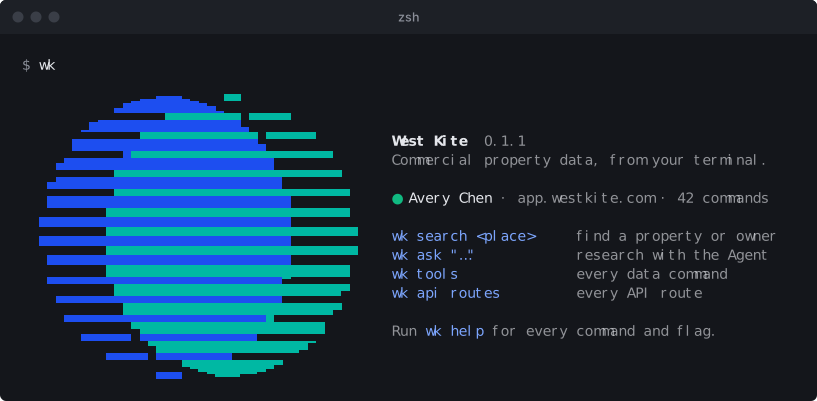
`wk` is West Kite in your terminal. It can read and change everything your account can: properties, owners and sales, your Pipeline, documents and saved work. Use it for quick lookups and scripts, or let a coding agent like Claude Code or Codex drive it.
## Install
```sh
npx westkite login
```
That opens your browser. Sign in, or [create an account](https://app.westkite.com/sign-up), then select Allow. The 7-day trial needs no card. You need Node 20 or later.
To keep `wk` on your PATH instead of using `npx` each time:
```sh
npm install -g westkite
wk login
```
## Search and screen
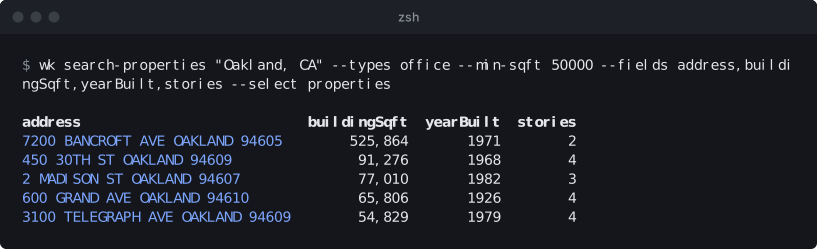
Every data command in West Kite is a `wk` command, with the same filters as the app. `wk search` finds a property or owner by name or address. `wk search-properties` screens a market, and `--fields` keeps only the columns you want.
`wk tools` lists every data command your account has, and `wk --help` shows its options. New commands appear on their own, without updating the CLI.
## Ask the Agent
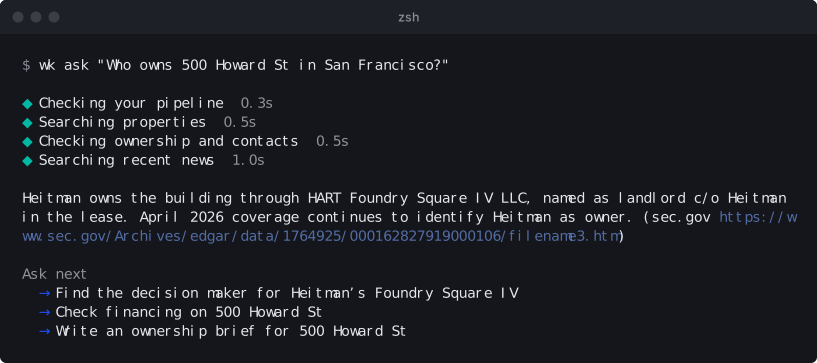
`wk ask` puts a question to the West Kite Agent. You see each step as it works, then the answer with its sources and a few questions to ask next. `wk ask --continue` carries on the same conversation.
## Use it from an agent
Paste this into Claude Code or Codex:
```text
Run npx westkite agent, then use the West Kite CLI to look up 500 Howard St in San Francisco.
```
When its output goes to another program, `wk` prints JSON, and `--fields` and `--select` keep just what's needed. Errors come back as JSON with an exit code, so an agent can tell a missing record from an expired sign-in. `wk agent` prints the full guide for agents, and `wk api` reaches every route of the web app's API.
## Changes need your approval
Anything that changes your account, like saving a property or adding a lead, asks before it runs. Add `--yes` to approve it in the same command, or approve it later in West Kite. Sign in with `wk login --read-only` for a session that can't change anything.
## Manage your session
The CLI shows up in West Kite under Connect AI, on the Agent page, as West Kite CLI. You can disconnect it there, or run `wk logout`. `wk status` shows who you're signed in as, and `wk doctor` checks the connection end to end.
## Common questions
### Do I need an API key?
No. `wk login` signs you in through your browser and keeps the session on your computer, refreshing it as needed. For a script in CI, `wk token` prints a token that lasts an hour.
### How is this different from the MCP server?
Both reach the same data. The [MCP server](https://westkite.com/docs/connect.md) is for assistants like Claude and ChatGPT. The CLI is for terminals and agents that run commands, and it also reaches your whole account, including every route of the web app's API through `wk api`.
### Can I use it in a team organization?
Yes. Add `--org` with your organization's ID to act in it. West Kite checks that you're a member.